Hexapod
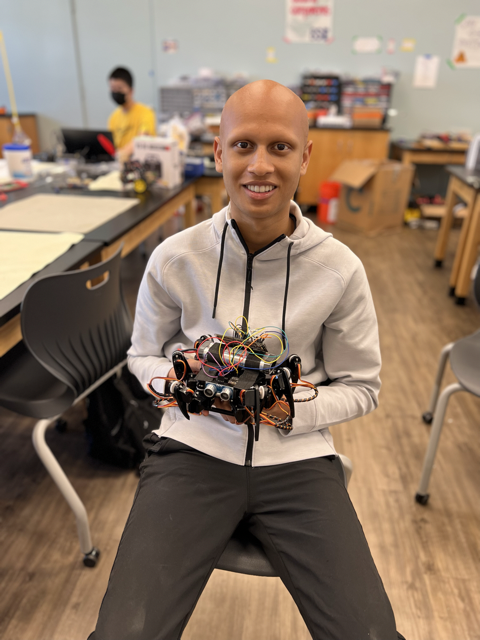
A hexapod robot is a robot that walks on six legs, which allows it to have greater flexibility in its movement than wheel robots, like being able to walk on uneven terrain or climb up on elevation. Since the robot has so many legs, it still functions normally even if one of the legs is damaged. The hexapod can be used to detect obstacles in its way using an ultrasonic sensor or to complete a series of motions like the Cupid Shuffle Dance.
| Engineer | School | Area of Interest | Grade |
|---|---|---|---|
| Arnav M | Monta Vista High School | Electrical Engineering/Computer Science | Incoming Senior |
Modifications
For my first modification, I added an ultrasonic sensor to the front of the robot. With the ultrasonic sensor, I was able to program the robot so that it detects obstacles in front of it and changes its movement accordingly. The first thing I had to do was connect the ultrasonic sensor. Before doing anything, I researched how to connect the ultrasonic sensor to the circuit board, so that I didn’t short-circuit the board. The ultrasonic sensor has 4 ports which are the Voltage Common Collector (VCC) pin, ground pin, trigger pin (trigPin), and echo pin. I connected all of the pins to their ports using male-to-female jumper wires. The VCC connects to the 5V port, the ground connects to the ground (GND) port, and the trigger and echo pins to any digital ports.
As I started coding the ultrasonic sensor, I encountered my first issue. Before, my battery sat along the board, but that covered the digital ports. Although I was still able to connect the jumper wires to those ports, the battery would bend the jumper wires and loosen their connection, which caused issues when it came to coding, as it caused me to believe that there were issues in my code, but in reality, it was the connection. Therefore, I changed the configuration of my battery so that it sat across the base of the robot, instead of along it. Also, it sat towards the back of the robot, so that it was not covering any of the ports.
To code the ultrasonic sensor, the first thing I did was learn how the ultrasonic sensor works. The trigPin will send out a wave, and the echo pin will capture the reflected wave. The sensor then measures how long it takes for the wave to return in microseconds. To convert from microseconds to distance in centimeters, I had to divide by 58.2. When I first coded it, I tried to send out another wave every time I wanted an input, which caused the sensor to detect obstacles late and overall was a very faulty system.
I also tried to use a PIR sensor to do the same task. While the PIR sensor seemed to be better at detecting obstacles, I wasn’t able to control at what distance the robot would start turning so I decided to go back to the ultrasonic sensor.
I ended up creating a new distance method and would implement that method every time I wanted input. I also took it slower and ensured each part of my code worked. Since most of the code was just for, if, or while loops, I would just add a print statement right after the loop on the serial monitor to make sure that the loops were being exited. Through this method, I found out that I had an indefinite while loop, so I fixed that. I also realized that one of my variables wasn’t initialized so I fixed that as well.
In the end, the robot is programmed to detect obstacles from 20 centimeters away and to detect the most optimal path away from the obstacle.
For my next modification, I decided to add an LCD that displays the distance of the obstacle. The first thing I did, was solder pin headers to the display, so I could just plug in the display to the breadboard. Once I did that, I started the wiring between, the breadboard and circuit board. Most pins were connected to ground, 5V, or a digital Arduino pin. Once I ensured that the display would turn on, I tested some basic code to print on the display screen.
One issue I had with the display was the brightness of the display itself. Initially, I didn’t use any resistors, but the display was very hard to read, so I ended up adding two 1000 ohm resistors in series of the 3rd pin of the LCD.
Once I ensured that was working, I weaved the LCD code into the ultrasonic sensor code. Since the code for the ultrasonic sensor already calculated the distance and stored it in a variable, all I had to do was print the variable, which worked perfectly.
Once I was sure that the ultrasonic sensor and LCD worked together properly, I started moving all of the components to a solderable breadboard so that it would look cleaner than a normal breadboard, and the connections would be permanent and secure.
The last issue I had was with soldering the jumper wires. For some reason, when soldering the jumper wires, I would accidentally bridge two pin holes with solder on accident. I didn’t have an issue with the resistors or the soldering of the LCD onto the breadboard.
After I finished transferring all of the components, I ensured that the code still worked as it was supposed to, which it did.
Overall, during my time at BlueStamp, I had a lot of fun. I made a lot of new friends that came from very different backgrounds. The instructors are very knowledgeable and can help with most issues, but they encourage you to try on your own first. The entire experience is very hands-on and unique compared to any other engineering program. You are also able to talk to engineers in various fields and have experience at big companies like Apple or Google. I also learned many new things, like how to solder, how to use an ultrasonic sensor and LCD, how to code on an Arduino specifically, and how to work with servo motors.
Final Milestone
For my final milestone, I was able to make the hexapod complete a series of motions like a little dance or waving one leg, but the main one I was focusing on was the Cupid Shuffle Dance. To make the hexapod do the Cupid Shuffle, I had to code every single motion, like moving to the right or raising one leg. One of the issues I faced was coding in Arduino since Arduino uses a variant of C++, and I’ve never used C++ before. However, C++ and Java are pretty similar, so I was able to learn C++ pretty quickly. Another issue I faced was finding the exact values that I had to assign for each motion. Since the series of motions is very complex, and I have to specify the value for each of the legs in each motion, I had to assign a lot of values to get the motions exactly how I wanted them.
I also had a bit of a hard time coding the motions of the robot so that it would be synced to the music because a slight value error in the code could cause the rest of the dance to not be synced.
For this milestone, I also added another baseboard and Velcro straps with which I can strap the battery so that the battery is not hanging loose and is securely attached to the robot. One issue I faced with the Velcro was how sticky the adhesive was because it made the Velcro very hard to work with. I ended up not removing the plastic covering the adhesive so that I didn’t have to work with the sticky part. I also had a hard time finding the right standoffs to attach the baseboard. Since the extra baseboard was not part of the kit, I had to find my own standoffs, but I ended up just using M3 standoffs again.
The last big issue I had was with broken motors. After I finished coding the Cupid Shuffle dance, I came back the next day, and a couple of the servo motors stopped working overnight. To fix it, I had to replace the motors by disassembling two of the baseboards, replacing the motor, then recalibrating the robot, and then re-uploading the code for the Cupid Shuffle.
Some of the key topics I learned about was using for loops. Since the Cupid Shuffle dance is very repetitive, I either have to write out the same code over and over. However, with for loops, I was able to repeat the same motions as many times as I wanted, which in this case was first 5 times then 7 times.
For my next steps for this project, I am going to attach an Arduino speaker, so that I can play the music from the robot, instead of my laptop. In this way, the music will automatically be synced. To do this, I need to solder male-to-male jumper wires onto the Arduino speaker, and then attach the other ends to the circuit board to the ground and any Digital I/O terminal.
Second Milestone
For my second milestone, the first thing I did was attach the other baseplate using M3 standoffs to the other side of the robot so that the circuit board is protected from any harm, and so the robot looks better. I used M3 standoffs instead of M3 screws so that I can attach screw a piece of wood into the standoffs, to which I can strap my battery.
The next thing I did was calibrate the robot. I did this by using the calibration tab in the Processing app. Using the calibration sheet provided, I had to move each leg in three dimensions so that the robot lined up with the diagram on the calibration sheet.
Then, I moved on to controlling the robot through Wi-Fi using the WLAN module. However, I mistook the remote control module for the WLAN module, which caused the circuit board to heat up, so I immediately turned off the power and removed the battery. However, I didn’t realize that this caused the calibration to reset. From that, I learned that I have to leave the battery connected at all times, otherwise, the calibration will reset. I recalibrated the robot, using the calibration sheet again.
After I finished calibrating the robot again, I attached the correct WLAN module to its correct port on the circuit board. This created a hotspot, which I connected my laptop to. From then on, I was able to control the robot through the control tab on the Processing app.
One issue I faced at the end was the robot momentarily disconnecting from its hotspot. This is just because the hotspot is not as reliable as the Wi-Fi, but is irrelevant, as the robot connects back to the hotspot by itself.
So far, building the hexapod has been the most challenging part of this project. Reaching my first milestone took me close to a week, but to reach my second milestone, it only took me one day. Overall, this project is much heavier on the mechanical engineering side, rather than the electrical engineering or computer science side.
My next step is going to be controlling the robot through the remote controller and through my phone using the Freenove app. After that, my first modification is to build something to hold the battery, so that it is not sitting loose on top of the robot.
First Milestone
My intensive project is a hexapod, a robot that has 6 legs and can walk on any terrain. In order to build it, I have to first build the individual parts of the hexapod, attach the legs, complete the wiring, and then lastly calibrate the robot. The individual parts of the hexapod include the base, the circuit board, the legs, and the battery. First, the circuit board is attached to the base, and the battery is connected to the circuit board. Lastly, each leg is attached to the base of the robot while the power is on so that the robot is calibrated properly. Each leg is made up of 3 servo motors, and 4 different acrylic parts, which I attached together using screws and disc servo arms.
To set up the software, I had to install the Arduino and Processing IDEs. In the Arduino IDE, I had to install the FNHR, RF24, and FlexiTimer2 libraries. In the Processing IDE, I had to install the ControlP5 library. Then, in the Processing IDE, I had to open the Processing App, which opened the hexapod software, from which I can control, install, and calibrate the hexapod.
So far, I have built the base and attached all of the legs to the base, while ensuring that the legs are positioned correctly when the power is on.
One issue that came up was that I attached all of the legs when the battery was disconnected, which caused the legs to be positioned incorrectly. Therefore, I had to disassemble the robot, connect the battery, turn on the power, and reinstall the legs.
Another issue that came up was one of my battery contacts coming loose after I fully assembled my robot. I had to replace the circuit board, and basically, I had to rebuild the robot again from scratch.
The last issue that I faced was having broken servo motors, since the only way to check that, would be after it was assembled. If I found out that a motor was broken, I had to disassemble the leg, replace the servo motor, and reattach the leg. I had one motor that was spazzing out, one with a screw stuck in the outer shaft, and two with disconnected wires, so I had to replace all 4 of them.
My next steps are to calibrate the robot so that its default position is how I want it, then I should be able to control the robot as I want, using my laptop. Then, I need to connect the remote control and install the app on my phone, so that I can control the hexapod with the remote or with my phone.
Starter Project
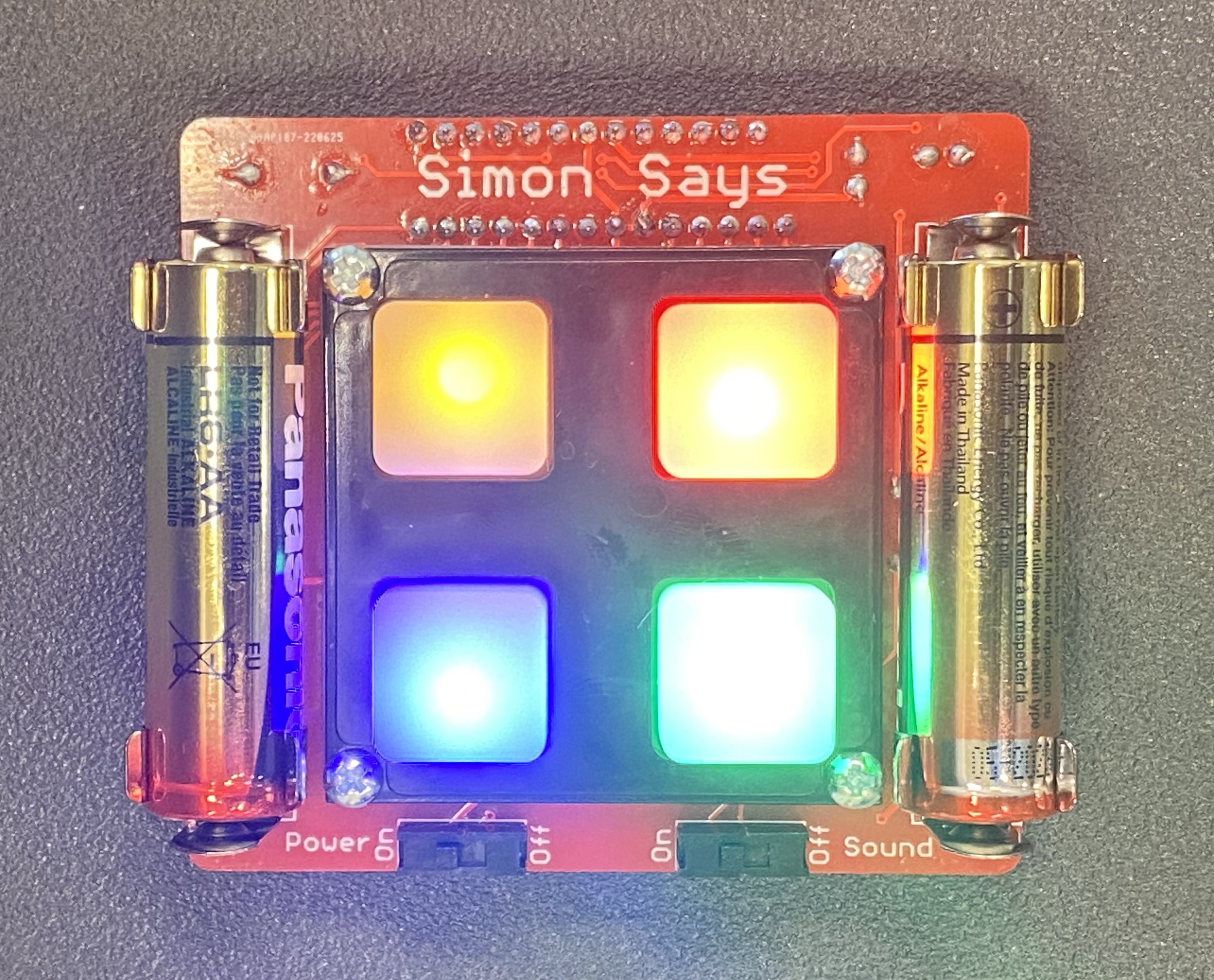
My starter project was building a Simon Says Machine. To build the machine, I had to solder the LEDs, power and sound switches, battery clips, decoupling caps, a microcontroller, and an alarm.
My main difficulty was manipulating the solder so that the shape of it looks clean and appealing. I fixed this by applying the solder first, and if I was unhappy with the shape, I manipulated the solder using the soldering iron to remelt and reshape the solder.
The machine works by emitting a series of colors and sounds, and the user’s job is to copy exactly what the machine does like the game, Simon Says. Each of the four buttons has a unique color and sound to make it easier for the user and also more accessible for everyone. The game will keep adding onto the pattern until the user messes up the pattern, at which point, the machine will make a loud beeping sound and all four of the lights will go off.
The Simon Says Machine can be found here.
Schematics
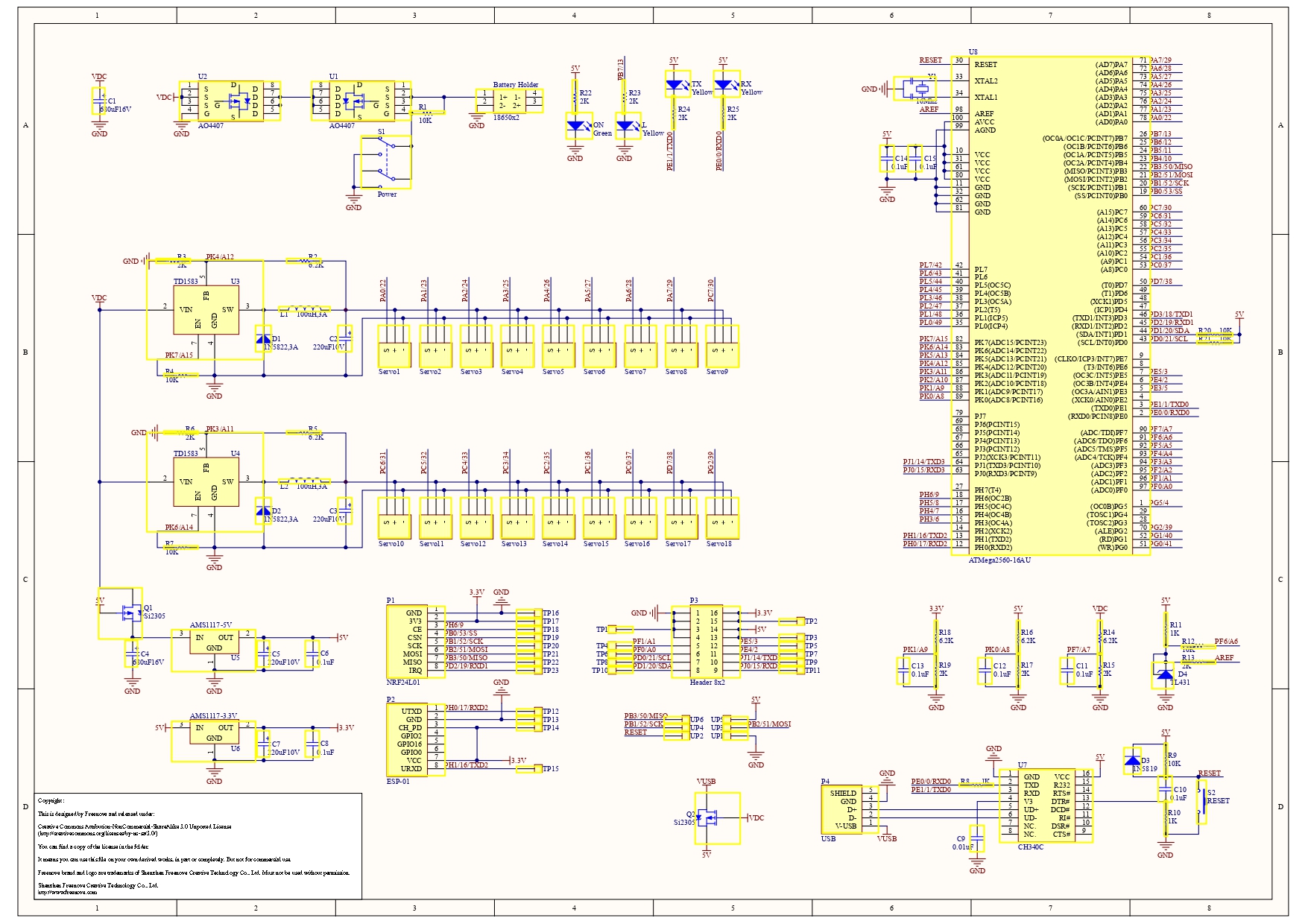
The schematic details the components used to make Freenove’s Arduino Mega 2560 for this robot.
Code
I wrote this code in the Arduino IDE. When uploaded to the hexapod, it will detect obstacles on its path and will find the most optimal way to avoid the obstacle. It will also display the distance from the obstacle on the LCD display attached to the robot. The code uses an ultrasonic sensor and an LCD display.
#include <LiquidCrystal.h>

// LCD pins <--> Arduino pins
const int RS = 15, EN = 14, D4 = A1, D5 = A0, D6 = 21, D7 = 20;
LiquidCrystal lcd(RS, EN, D4, D5, D6, D7);


#ifndef ARDUINO_AVR_MEGA2560
#error Wrong board. Please choose "Arduino/Genuino Mega or Mega 2560"
#endif

// Include FNHR (Freenove Hexapod Robot) library
#include <FNHR.h>

FNHR robot;


int count, count2;
int trigPin = 3;      // sets trig pin of HC-SR04
int echoPin = 2;     // sets echo pin of HC-SR04
int TempDist;

float duration, distance, distanceLeft, durationLeft, distanceRight, durationRight; //defines all variables

void setup() {
  lcd.begin(16, 2); // set up number of columns and rows
  robot.Start(); //starts robot
  pinMode(trigPin, OUTPUT);         // set trig pin as output
  pinMode(echoPin, INPUT);          //set echo pin as input to capture reflected waves
  Serial.begin(9600); //starts serial monitor
}

void loop() {
  dist2(); //initializes variables
  count = 0;
  count2 = 0;

  if (distance >= 15) //if object distance is not within 15 centimeters, robot will crawl forward
  {
    robot.CrawlBackward(); //crawl forwards
  }

  else //if object distance is within 15 centimeters, robot will turn left until object distance is greater than 15 centimeters, counting how many motions it takes
  {
    while (distance < 15) {
      lcd.setCursor(0, 0);                       // move cursor to   (0, 0)
      lcd.print("Distance: ");        // print message at (0, 0)
      lcd.setCursor(0, 1);
      lcd.print(distance);
      Serial.println("LEFT");
      robot.TurnLeft();
      dist2();
      count++;
    }
    Serial.println(count); //returns back to original position based on the number of motions counted
    for (int i = 1; i <= count; i++) {
      robot.TurnRight();
    }
    while (distance < 20) { //if object distance is within 20 centimeters (to make up for any difference caused by motor imbalance), robot will turn to the right until object distance is greater than 20 centimeters, counting how many motions it takes
      lcd.setCursor(0, 0);                       // move cursor to   (0, 0)
      lcd.print("Distance: ");        // print message at (0, 0)
      lcd.setCursor(0, 1);
      lcd.print(distance);
      Serial.println("RIGHT");
      robot.TurnRight();
      dist2();
      count2++;
    }

    for (int i = 1; i <= count2; i++) { //returns back to original position based on the number of motions counted
      robot.TurnLeft();
    }
    if (count <= count2) { //if count is less on left side, robot will turn left
      for (int i = 1; i <= count; i++) {
        robot.TurnLeft();
      }
      for (int i = 1; i <= 20; i++) //robot crawls left 20 times, then returns to the start of the loop and crawls forward
        robot.CrawlRight();
    }
    else {
      for (int i = 1; i <= count2; i++) { //if count is less on right side, robot will turn right
        robot.TurnRight();
      }
      for (int i = 1; i <= 20; i++) //robot crawls right 20 times, then returns to the start of the loop and crawls forward
        robot.CrawlLeft();
    }
  }
}

void dist2() { //distance method to find the distance based on the time measured between the wave was sent out and received back
  digitalWrite(trigPin, LOW);
  delayMicroseconds(2);
  digitalWrite(trigPin, HIGH);     // send waves for 10 us
  delayMicroseconds(10);
  duration = pulseIn(echoPin, HIGH); // receive reflected waves
  distance = duration / 58.2;
}
I wrote this code in the Arduino IDE. When the code is uploaded to the hexapod, the hexapod will do the Cupid Shuffle dance, which is synced up with the actual song.
#ifndef ARDUINO_AVR_MEGA2560
#error Wrong board. Please choose "Arduino/Genuino Mega or Mega 2560"
#endif

// Include FNHR (Freenove Hexapod Robot) library
#include <FNHR.h>

FNHR robot;

void setup() {
  // Custom setup code start

  // Custom setup code end
  // Start Freenove Hexapod Robot
  robot.Start();
}

void loop() {
  // Custom loop code start
  delay (2500);

  for (int i = 0; i <= 1; i++) //starts freestyle for the beginning of the dance
  {
    robot.MoveBody(0, 30, 0);
    robot.MoveBody(0, -30, 0);
    robot.MoveBody(30, 0, 0);
    robot.MoveBody(-30, 0, 0);
    robot.MoveBody(0, 0, -45);
    robot.MoveBody(0, 0, 45);
  }

  for (int i = 0; i <= 1; i++)
  {
    robot.RotateBody(15, 0, 0);
    robot.RotateBody(0, 15, 0);
    robot.RotateBody(-15, 0, 0);
    robot.RotateBody(0, -15, 0);
    robot.RotateBody(0, 0, 0);
    robot.RotateBody(0, 0, 15);
  }

  for (int i = 0; i <= 1; i++)
  {
    robot.RotateBody(0, 0, 0);
    robot.RotateBody(0, 0, 15);
    robot.RotateBody(0, 0, -15);
    robot.RotateBody(0, 0, 0);
    robot.MoveBody(0, 30, 0);
    robot.MoveBody(0, -30, 0);
  }
  for (int i = 0; i <= 1; i++)
  {
    robot.RotateBody(0, 0, -15);
    robot.RotateBody(0, 0, 0);
    robot.MoveBody(0, 30, 0);
    robot.MoveBody(0, -30, 0);
    robot.MoveBody(0, 30, 0);
    robot.MoveBody(0, 30, 0);
  }
  for (int i = 0; i <= 2; i++)
  {
    robot.MoveBody(0, 30, 0);
    robot.MoveBody(-30, 0, 0);
    robot.MoveBody(0, -30, 0);
    robot.MoveBody(30, 0, 0);
    robot.MoveBody(0, 0, 0);
    robot.MoveBody(0, 0, 45);
  }

  robot.MoveBody(0, 0, -45);
  robot.MoveBody(0, 0, 45);

  delay (1000);

  for (int i = 0; i <= 1; i++)
  {
    for (int i = 1; i <= 14; i++)
    {
      robot.CrawlRight(); //crawls to the right
    }

    delay (150);

    for (int i = 1; i <= 15; i++)
    {
      robot.CrawlLeft(); //crawls to the left
    }


    //leg kicks
    robot.LegMoveToRelatively(1, 10, 60, 50);
    delay(438);
    robot.LegMoveToRelatively(1, -10, -60, -50);

    robot.LegMoveToRelatively(4, 10, 60, 50);
    delay(438);
    robot.LegMoveToRelatively(4, -10, -60, -50);

    robot.LegMoveToRelatively(1, 10, 60, 50);
    delay(438);
    robot.LegMoveToRelatively(1, -10, -60, -50);

    robot.LegMoveToRelatively(4, 10, 60, 50);
    delay(438);
    robot.LegMoveToRelatively(4, -10, -60, -50);

    for (int i = 1; i <= 14; i++)
    {
      robot.TurnLeft(); //turns 90 degrees to the left
    }
  }
  delay(250);

  //repeats same set of motions as before
  for (int i = 0; i <= 2; i++)
  {
    for (int i = 1; i <= 14; i++)
    {
      robot.CrawlRight(); //crawls to the right
    }
    for (int i = 1; i <= 15; i++)
    {
      robot.CrawlLeft(); //crawls to the left
    }


    //leg kicks
    robot.LegMoveToRelatively(1, 10, 60, 50);
    delay(438);
    robot.LegMoveToRelatively(1, -10, -60, -50);

    robot.LegMoveToRelatively(4, 10, 60, 50);
    delay(438);
    robot.LegMoveToRelatively(4, -10, -60, -50);

    robot.LegMoveToRelatively(1, 10, 60, 50);
    delay(438);
    robot.LegMoveToRelatively(1, -10, -60, -50);

    robot.LegMoveToRelatively(4, 10, 60, 50);
    delay(438);
    robot.LegMoveToRelatively(4, -10, -60, -50);

    for (int i = 1; i <= 15; i++)
    {
      robot.TurnLeft(); //turns 90 degrees to the left
    }
  }
  //freestyle for the middle of the song
  robot.SleepMode();
  robot.MoveBody(0, 30, 0);
  robot.MoveBody(-30, 0, 0);
  robot.MoveBody(0, -30, 0);
  robot.MoveBody(30, 0, 0);
  robot.MoveBody(0, 0, 0);
  robot.MoveBody(0, 0, 45);
  robot.MoveBody(0, 0, 0);
  robot.RotateBody(15, 0, 0);
  robot.RotateBody(0, 15, 0);
  robot.RotateBody(-15, 0, 0);
  robot.RotateBody(0, -15, 0);
  robot.RotateBody(0, 0, 0);
  robot.RotateBody(0, 0, 15);
  robot.RotateBody(0, 0, -15);
  robot.RotateBody(0, 0, 0);
  robot.MoveBody(0, 30, 0);
  robot.MoveBody(0, -30, 0);
  robot.MoveBody(0, 30, 0);


  for (int i = 0; i <= 6; i++)
  {
    for (int i = 1; i <= 15; i++)
    {
      robot.CrawlRight(); //crawls to the right
    }
    for (int i = 1; i <= 15; i++)
    {
      robot.CrawlLeft(); //crawls to the left
    }


    //leg kicks
    robot.LegMoveToRelatively(1, 10, 60, 50);
    delay(438);
    robot.LegMoveToRelatively(1, -10, -60, -50);

    robot.LegMoveToRelatively(4, 10, 60, 50);
    delay(438);
    robot.LegMoveToRelatively(4, -10, -60, -50);

    robot.LegMoveToRelatively(1, 10, 60, 50);
    delay(438);
    robot.LegMoveToRelatively(1, -10, -60, -50);

    robot.LegMoveToRelatively(4, 10, 60, 50);
    delay(438);
    robot.LegMoveToRelatively(4, -10, -60, -50);

    for (int i = 1; i <= 14; i++)
    {
      robot.TurnLeft(); //turns 90 degrees to the left
    }
  }


  robot.SleepMode(); //robot switches to sleep mode and decompresses

  while (true);
  // Custom loop code end
}
This code is run in the Processing IDE in C++. When run, the Processing App comes up from which you can install, calibrate, and control the hexapod. I did not write the code for the Processing App.
// control robot
ControlRobot controlRobot = new ControlRobot(this);
// gui
import controlP5.*;
ControlP5 cp5;
PFont font;
Textlabel textlabelInfo;
Textlabel textlabelVoltage;
Slider2D slider2dMove;
Slider2D slider2dRotate;
// images for gui
PImage pImageControl;
PImage pImageTwistBody;
PImage pImageCalibration;
PImage pImageInstallation;
// constants for gui
final color backgroundColor = color(128);
final color globalTabColor = color(102);
final int globalTapHeight = 100;
final int tabWidth = 128;
final int tabHeight = 24;
// event
int eventId = 0;
boolean isProcessEvent = false;
// voltage
int lastGetVoltage = 0;

void setup() {
  size(800, 600);
  noStroke();
  font = createFont("Lucida Sans Regular", 16);
  textFont(font);
  textAlign(CENTER, CENTER);
  pImageControl = loadImage("control.png");
  pImageTwistBody = loadImage("twistBody.png");
  pImageCalibration = loadImage("calibration.png");
  pImageInstallation = loadImage("installation.png");

  setControlP5();
}

void draw() {
  background(backgroundColor);
  fill(globalTabColor);
  rect(0, tabHeight, width, globalTapHeight);
  rect(0, height - tabHeight, width, tabHeight);
  fill(255, 255, 255);
  text("Press Enter to visit Freenove.com", width / 2, height - tabHeight / 2);

  if (cp5.getTab("default").isActive()) {
    image(pImageControl, 0, tabHeight + globalTapHeight);
  } else if (cp5.getTab("twist body").isActive()) {
    image(pImageTwistBody, 0, tabHeight + globalTapHeight);
  } else if (cp5.getTab("calibration").isActive()) {
    image(pImageCalibration, 0, tabHeight + globalTapHeight);
  } else if (cp5.getTab("installation").isActive()) {
    image(pImageInstallation, 0, tabHeight + globalTapHeight);
  }

  getVoltage();
  processEvent();
}

void getVoltage() {
  if (millis() - lastGetVoltage > 1500) {
    float voltage = controlRobot.GetVoltage();
    textlabelVoltage.setText(String.valueOf(voltage) + "V");
    lastGetVoltage = millis();
  }
}

void setEvent(int id) {
  if (eventId == 0) {
    eventId = id;
  }
}

void processEvent() {
  if (isProcessEvent) {
    processEvent(eventId);
    isProcessEvent = false;
    eventId = 0;
    textlabelInfo.setText("Ready");
  }
  if (eventId != 0) {
    isProcessEvent = true;
    textlabelInfo.setText("Processing...");
  }
}

void setControlP5() {
  cp5 = new ControlP5(this);
  cp5.setFont(font);

  setControlP5Tab();
  setControlP5Key();
}

void setControlP5Tab() {
  setControlP5TabGlobal();

  cp5.getTab("default")
    .setId(2)
    .setCaptionLabel("control")
    .setHeight(tabHeight)
    .setWidth(tabWidth)
    .activateEvent(true)
    .getCaptionLabel().align(CENTER, CENTER)
    ;
  setControlP5TabControl();

  cp5.addTab("twist body")
    .setId(3)
    .setHeight(tabHeight)
    .setWidth(tabWidth)
    .activateEvent(true)
    .getCaptionLabel().align(CENTER, CENTER)
    ;
  setControlP5TabTwistBody();

  cp5.addTab("calibration")
    .setId(4)
    .setHeight(tabHeight)
    .setWidth(tabWidth)
    .activateEvent(true)
    .getCaptionLabel().align(CENTER, CENTER)
    ;
  setControlP5TabCalibration();

  cp5.addTab("installation")
    .setId(5)
    .setHeight(tabHeight)
    .setWidth(tabWidth)
    .activateEvent(true)
    .getCaptionLabel().align(CENTER, CENTER)
    ;
}

void setControlP5TabGlobal() {
  cp5.addRadioButton("radioButton1")
    .setId(101)
    .setPosition(4, tabHeight + 11)
    .setSize(20, 20)
    .setItemsPerRow(2)
    .setSpacingRow(4)
    .setSpacingColumn(60)
    .addItem("serial", 1)
    .addItem("wi-fi", 2)
    .activate(0)
    .moveTo("global")
    ;

  cp5.addButton("connect")
    .setId(102)
    .setPosition(4, tabHeight + 11 + 20 + 10)
    .setSize(128, 48)
    .moveTo("global")
    .getCaptionLabel().align(CENTER, CENTER)
    ;

  textlabelInfo = cp5.addTextlabel("labelInfo")
    .setText(" ")
    .setPosition(4 + 128 + 24, tabHeight + 11 + 20 + 14)
    .setFont(createFont("Lucida Sans Regular", 32))
    .moveTo("global")
    ;

  textlabelVoltage = cp5.addTextlabel("labelVoltage")
    .setText("0.0V")
    .setPosition(width - 128, tabHeight + 11 + 20 + 14)
    .setFont(createFont("Lucida Sans Regular", 32))
    .moveTo("global")
    ;
}

void setControlP5TabControl() {
  ////
  int buttonWidth = 128;
  int buttonHeight = 48;
  int buttonSpacingX = 4;
  int buttonSpacingY = 4;
  //
  cp5.addButton("Forward(W)")
    .setId(201)
    .setPosition(4 + (buttonWidth + buttonSpacingX) * 1, 136 + (buttonHeight + buttonSpacingY) * 0)
    .setSize(buttonWidth, buttonHeight)
    .getCaptionLabel().align(CENTER, CENTER)
    ;

  cp5.addButton("Backward(S)")
    .setId(202)
    .setPosition(4 + (buttonWidth + buttonSpacingX) * 1, 136 + (buttonHeight + buttonSpacingY) * 2)
    .setSize(buttonWidth, buttonHeight)
    .getCaptionLabel().align(CENTER, CENTER)
    ;

  cp5.addButton("Left(A)")
    .setId(203)
    .setPosition(4 + (buttonWidth + buttonSpacingX) * 0, 136 + (buttonHeight + buttonSpacingY) * 1)
    .setSize(buttonWidth, buttonHeight)
    .getCaptionLabel().align(CENTER, CENTER)
    ;

  cp5.addButton("Right(D)")
    .setId(204)
    .setPosition(4 + (buttonWidth + buttonSpacingX) * 2, 136 + (buttonHeight + buttonSpacingY) * 1)
    .setSize(buttonWidth, buttonHeight)
    .getCaptionLabel().align(CENTER, CENTER)
    ;

  cp5.addButton("Turn left(Q)")
    .setId(205)
    .setPosition(4 + (buttonWidth + buttonSpacingX) * 0, 136 + (buttonHeight + buttonSpacingY) * 0)
    .setSize(buttonWidth, buttonHeight)
    .getCaptionLabel().align(CENTER, CENTER)
    ;

  cp5.addButton("Turn right(E)")
    .setId(206)
    .setPosition(4 + (buttonWidth + buttonSpacingX) * 2, 136 + (buttonHeight + buttonSpacingY) * 0)
    .setSize(buttonWidth, buttonHeight)
    .getCaptionLabel().align(CENTER, CENTER)
    ;
  //
  cp5.addButton("activate(z)")
    .setId(207)
    .setPosition(4 + (buttonWidth + buttonSpacingX) * 0, 136 + (buttonHeight + buttonSpacingY) * 4)
    .setSize(buttonWidth, buttonHeight)
    .getCaptionLabel().align(CENTER, CENTER)
    ;

  cp5.addButton("switch(x)")
    .setId(208)
    .setPosition(4 + (buttonWidth + buttonSpacingX) * 1, 136 + (buttonHeight + buttonSpacingY) * 4)
    .setSize(buttonWidth, buttonHeight)
    .getCaptionLabel().align(CENTER, CENTER)
    ;

  cp5.addButton("deactivate(c)")
    .setId(209)
    .setPosition(4 + (buttonWidth + buttonSpacingX) * 2, 136 + (buttonHeight + buttonSpacingY) * 4)
    .setSize(buttonWidth, buttonHeight)
    .getCaptionLabel().align(CENTER, CENTER)
    ;
  //
  cp5.addSlider("zBody")
    .setPosition(4 + (buttonWidth + buttonSpacingX) * 3 + 32, 136 + (buttonHeight + buttonSpacingY) * 0)
    .setId(210)
    .setSize(20, buttonHeight * 3 + buttonSpacingY * 2 - 24)
    .setRange(0, 45)
    .setDecimalPrecision(0)
    .setValue(0)
    ;
  cp5.getController("zBody").getCaptionLabel().align(ControlP5.CENTER, ControlP5.BOTTOM_OUTSIDE).setPaddingX(0);

  ////
  int toggleWidth = 95;
  int toggleHeight = 32;
  int toggleSpacingX = 4;
  int toggleSpacingY = 4;

  cp5.addToggle("20")
    .setId(211)
    .setPosition(4 + (toggleWidth + toggleSpacingX) * 0, 136 + (buttonHeight + buttonSpacingY) * 6 + (toggleHeight + toggleSpacingY) * 0)
    .setSize(toggleWidth, toggleHeight)
    .getCaptionLabel().align(CENTER, CENTER)
    ;

  cp5.addToggle("21")
    .setId(212)
    .setPosition(4 + (toggleWidth + toggleSpacingX) * 1, 136 + (buttonHeight + buttonSpacingY) * 6 + (toggleHeight + toggleSpacingY) * 0)
    .setSize(toggleWidth, toggleHeight)
    .getCaptionLabel().align(CENTER, CENTER)
    ;

  cp5.addToggle("a0")
    .setId(213)
    .setPosition(4 + (toggleWidth + toggleSpacingX) * 2, 136 + (buttonHeight + buttonSpacingY) * 6 + (toggleHeight + toggleSpacingY) * 0)
    .setSize(toggleWidth, toggleHeight)
    .getCaptionLabel().align(CENTER, CENTER)
    ;

  cp5.addToggle("a1")
    .setId(214)
    .setPosition(4 + (toggleWidth + toggleSpacingX) * 3, 136 + (buttonHeight + buttonSpacingY) * 6 + (toggleHeight + toggleSpacingY) * 0)
    .setSize(toggleWidth, toggleHeight)
    .getCaptionLabel().align(CENTER, CENTER)
    ;

  cp5.addToggle("15")
    .setId(215)
    .setPosition(4 + (toggleWidth + toggleSpacingX) * 0, 136 + (buttonHeight + buttonSpacingY) * 6 + (toggleHeight + toggleSpacingY) * 1)
    .setSize(toggleWidth, toggleHeight)
    .getCaptionLabel().align(CENTER, CENTER)
    ;

  cp5.addToggle("14")
    .setId(216)
    .setPosition(4 + (toggleWidth + toggleSpacingX) * 1, 136 + (buttonHeight + buttonSpacingY) * 6 + (toggleHeight + toggleSpacingY) * 1)
    .setSize(toggleWidth, toggleHeight)
    .getCaptionLabel().align(CENTER, CENTER)
    ;

  cp5.addToggle("2")
    .setId(217)
    .setPosition(4 + (toggleWidth + toggleSpacingX) * 2, 136 + (buttonHeight + buttonSpacingY) * 6 + (toggleHeight + toggleSpacingY) * 1)
    .setSize(toggleWidth, toggleHeight)
    .getCaptionLabel().align(CENTER, CENTER)
    ;

  cp5.addToggle("3")
    .setId(218)
    .setPosition(4 + (toggleWidth + toggleSpacingX) * 3, 136 + (buttonHeight + buttonSpacingY) * 6 + (toggleHeight + toggleSpacingY) * 1)
    .setSize(toggleWidth, toggleHeight)
    .getCaptionLabel().align(CENTER, CENTER)
    ;
}

void setControlP5TabTwistBody() {
  slider2dMove = cp5.addSlider2D("move")
    .setId(301)
    .setPosition(36, 136)
    .setSize(180, 180)
    .setMinMax(30, 30, -30, -30)
    .setValue(0, 0)
    .moveTo("twist body")
    ;

  cp5.addSlider("zMove")
    .setPosition(252, 136)
    .setId(302)
    .setSize(20, 180)
    .setRange(0, 45)
    .setDecimalPrecision(0)
    .setValue(0)
    .moveTo("twist body")
    ;
  cp5.getController("zMove").getCaptionLabel().align(ControlP5.CENTER, ControlP5.BOTTOM_OUTSIDE).setPaddingX(0);

  slider2dRotate = cp5.addSlider2D("rotate")
    .setId(303)
    .setPosition(36, 136 + 180 + 32)
    .setSize(180, 180)
    .setMinMax(-10, 10, 10, -10)
    .setValue(0, 0)
    .moveTo("twist body")
    ;

  cp5.addSlider("zRotate")
    .setPosition(252, 136 + 180 + 32)
    .setId(304)
    .setSize(20, 180)
    .setRange(10, -10)
    .setDecimalPrecision(0)
    .setValue(0)
    .moveTo("twist body")
    ;
  cp5.getController("zRotate").getCaptionLabel().align(ControlP5.CENTER, ControlP5.BOTTOM_OUTSIDE).setPaddingX(0);
}

void setControlP5TabCalibration() {
  cp5.addRadioButton("radioButton2")
    .setId(401)
    .setPosition(4, 136)
    .setSize(20, 20)
    .setItemsPerRow(6)
    .setSpacingRow(4)
    .setSpacingColumn(60)
    .addItem("leg1", 1)
    .addItem("leg2", 2)
    .addItem("leg3", 3)
    .addItem("leg4", 4)
    .addItem("leg5", 5)
    .addItem("leg6", 6)
    .activate(0)
    .moveTo("calibration")
    ;

  ////
  int buttonWidth = 64;
  int buttonHeight = 48;
  int buttonSpacingX = 4;
  int buttonSpacingY = 4;
  //
  cp5.addButton("y+(w)")
    .setId(402)
    .setPosition(4 + (buttonWidth + buttonSpacingX) * 1, 136 + (buttonHeight + buttonSpacingY) * 1)
    .setSize(buttonWidth, buttonHeight)
    .moveTo("calibration")
    .getCaptionLabel().align(CENTER, CENTER)
    ;

  cp5.addButton("y-(s)")
    .setId(403)
    .setPosition(4 + (buttonWidth + buttonSpacingX) * 1, 136 + (buttonHeight + buttonSpacingY) * 3)
    .setSize(buttonWidth, buttonHeight)
    .moveTo("calibration")
    .getCaptionLabel().align(CENTER, CENTER)
    ;

  cp5.addButton("x+(a)")
    .setId(404)
    .setPosition(4 + (buttonWidth + buttonSpacingX) * 0, 136 + (buttonHeight + buttonSpacingY) * 2)
    .setSize(buttonWidth, buttonHeight)
    .moveTo("calibration")
    .getCaptionLabel().align(CENTER, CENTER)
    ;

  cp5.addButton("x-(d)")
    .setId(405)
    .setPosition(4 + (buttonWidth + buttonSpacingX) * 2, 136 + (buttonHeight + buttonSpacingY) * 2)
    .setSize(buttonWidth, buttonHeight)
    .moveTo("calibration")
    .getCaptionLabel().align(CENTER, CENTER)
    ;

  cp5.addButton("z+(r)")
    .setId(406)
    .setPosition(4 + (buttonWidth + buttonSpacingX) * 3.5, 136 + (buttonHeight + buttonSpacingY) * 1)
    .setSize(buttonWidth, buttonHeight)
    .moveTo("calibration")
    .getCaptionLabel().align(CENTER, CENTER)
    ;

  cp5.addButton("z-(f)")
    .setId(407)
    .setPosition(4 + (buttonWidth + buttonSpacingX) * 3.5, 136 + (buttonHeight + buttonSpacingY) * 3)
    .setSize(buttonWidth, buttonHeight)
    .moveTo("calibration")
    .getCaptionLabel().align(CENTER, CENTER)
    ;
  //
  cp5.addButton("confirm")
    .setId(408)
    .setPosition(4 + (buttonWidth + buttonSpacingX) * 0, 136 + (buttonHeight + buttonSpacingY) * 4.5)
    .setSize(buttonWidth * 2 + buttonSpacingX, buttonHeight)
    .moveTo("calibration")
    .getCaptionLabel().align(CENTER, CENTER)
    ;

  cp5.addButton("reset")
    .setId(409)
    .setPosition(4 + (buttonWidth + buttonSpacingX) * 2.5, 136 + (buttonHeight + buttonSpacingY) * 4.5)
    .setSize(buttonWidth * 2 + buttonSpacingX, buttonHeight)
    .moveTo("calibration")
    .getCaptionLabel().align(CENTER, CENTER)
    ;

  cp5.addButton("verify")
    .setId(410)
    .setPosition(4 + (buttonWidth + buttonSpacingX) * 0, 136 + (buttonHeight + buttonSpacingY) * 6.5)
    .setSize(buttonWidth * 2 + buttonSpacingX, buttonHeight)
    .moveTo("calibration")
    .getCaptionLabel().align(CENTER, CENTER)
    ;
}

void setControlP5Key() {
  cp5.mapKeyFor(new ControlKey() {
    public void keyEvent() {
      if (cp5.getTab("default").isActive()) {
        setEvent(201);
      } else if (cp5.getTab("calibration").isActive()) {
        setEvent(402);
      }
    }
  }
  , 'w');

  cp5.mapKeyFor(new ControlKey() {
    public void keyEvent() {
      if (cp5.getTab("default").isActive()) {
        setEvent(202);
      } else if (cp5.getTab("calibration").isActive()) {
        setEvent(403);
      }
    }
  }
  , 's');

  cp5.mapKeyFor(new ControlKey() {
    public void keyEvent() {
      if (cp5.getTab("default").isActive()) {
        setEvent(203);
      } else if (cp5.getTab("calibration").isActive()) {
        setEvent(404);
      }
    }
  }
  , 'a');

  cp5.mapKeyFor(new ControlKey() {
    public void keyEvent() {
      if (cp5.getTab("default").isActive()) {
        setEvent(204);
      } else if (cp5.getTab("calibration").isActive()) {
        setEvent(405);
      }
    }
  }
  , 'd');

  cp5.mapKeyFor(new ControlKey() {
    public void keyEvent() {
      if (cp5.getTab("default").isActive()) {
        setEvent(205);
      }
    }
  }
  , 'q');

  cp5.mapKeyFor(new ControlKey() {
    public void keyEvent() {
      if (cp5.getTab("default").isActive()) {
        setEvent(206);
      }
    }
  }
  , 'e');

  cp5.mapKeyFor(new ControlKey() {
    public void keyEvent() {
      if (cp5.getTab("default").isActive()) {
        setEvent(207);
      }
    }
  }
  , 'z');

  cp5.mapKeyFor(new ControlKey() {
    public void keyEvent() {
      if (cp5.getTab("default").isActive()) {
        setEvent(208);
      }
    }
  }
  , 'x');

  cp5.mapKeyFor(new ControlKey() {
    public void keyEvent() {
      if (cp5.getTab("default").isActive()) {
        setEvent(209);
      }
    }
  }
  , 'c');

  cp5.mapKeyFor(new ControlKey() {
    public void keyEvent() {
      if (cp5.getTab("calibration").isActive()) {
        setEvent(406);
      }
    }
  }
  , 'r');

  cp5.mapKeyFor(new ControlKey() {
    public void keyEvent() {
      if (cp5.getTab("calibration").isActive()) {
        setEvent(407);
      }
    }
  }
  , 'f');

  // press Enter to visit website
  cp5.mapKeyFor(new ControlKey() {
    public void keyEvent() {
      link("http://www.freenove.com");
    }
  }
  , '\n');

  cp5.mapKeyFor(new ControlKey() {
    public void keyEvent() {
      link("http://www.freenove.com");
    }
  }
  , '\r');
}

public void controlEvent(ControlEvent theEvent) {
  setEvent(theEvent.getId());
}

int zBodyLast, xMoveLast, yMoveLast, zMoveLast, xRotateLast, yRotateLast, zRotateLast;

public void processEvent(int id) {
  final int dL = 1;

  float value[];

  switch(id) {
    // connection
    case(102):
    if (cp5.getGroup("radioButton1").getValue() == 1) {
      if (!controlRobot.communication.isSerialAvailable) {
        if (controlRobot.communication.StartSerial())
        {
          cp5.getController("connect").setCaptionLabel("disconnect");
          cp5.getGroup("radioButton1").getController("serial").lock();
          cp5.getGroup("radioButton1").getController("wi-fi").lock();
          cp5.getGroup("radioButton1").getController("serial").setColorLabel(160);
          cp5.getGroup("radioButton1").getController("wi-fi").setColorLabel(160);

          if (cp5.getTab("default").isActive()) {
            processEvent(2);
          } else if (cp5.getTab("twist body").isActive()) {
            processEvent(3);
          } else if (cp5.getTab("calibration").isActive()) {
            processEvent(4);
          } else if (cp5.getTab("installation").isActive()) {
            processEvent(5);
          }
        }
      } else {
        controlRobot.communication.StopSerial();
        cp5.getController("connect").setCaptionLabel("connect");
        cp5.getGroup("radioButton1").getController("serial").unlock();
        cp5.getGroup("radioButton1").getController("wi-fi").unlock();
        cp5.getGroup("radioButton1").getController("serial").setColorLabel(255);
        cp5.getGroup("radioButton1").getController("wi-fi").setColorLabel(255);
      }
    } else {
      if (!controlRobot.communication.isClientAvailable) {
        if (controlRobot.communication.StartClient())
        {
          cp5.getController("connect").setCaptionLabel("disconnect");
          cp5.getGroup("radioButton1").getController("serial").lock();
          cp5.getGroup("radioButton1").getController("wi-fi").lock();
          cp5.getGroup("radioButton1").getController("serial").setColorLabel(160);
          cp5.getGroup("radioButton1").getController("wi-fi").setColorLabel(160);

          if (cp5.getTab("default").isActive()) {
            processEvent(2);
          } else if (cp5.getTab("twist body").isActive()) {
            processEvent(3);
          } else if (cp5.getTab("calibration").isActive()) {
            processEvent(4);
          } else if (cp5.getTab("installation").isActive()) {
            processEvent(5);
          }
        }
      } else {
        controlRobot.communication.StopClient();
        cp5.getController("connect").setCaptionLabel("connect");
        cp5.getGroup("radioButton1").getController("serial").unlock();
        cp5.getGroup("radioButton1").getController("wi-fi").unlock();
        cp5.getGroup("radioButton1").getController("serial").setColorLabel(255);
        cp5.getGroup("radioButton1").getController("wi-fi").setColorLabel(255);
      }
    }
    break;

    // switch tab
    case(2):
    cp5.getController("zBody").setValue(0);
    controlRobot.ChangeBodyHeight(0);
    controlRobot.ActiveMode();
    zBodyLast = 0;
    break;
    case(3):
    slider2dMove.setValue(0, 0);
    cp5.getController("zMove").setValue(0);
    slider2dRotate.setValue(0, 0);
    cp5.getController("zRotate").setValue(0);
    controlRobot.TwistBody(0, 0, 0, 0, 0, 0);
    xMoveLast = 0;
    yMoveLast = 0;
    zMoveLast = 0;
    xRotateLast = 0;
    yRotateLast = 0;
    zRotateLast = 0;
    break;
    case(4):
    controlRobot.ChangeBodyHeight(0);
    controlRobot.SleepMode();
    controlRobot.CalibrateState();
    cp5.getController("confirm").unlock();
    cp5.getController("confirm").setColorLabel(255);
    break;
    case(5):
    controlRobot.InstallState();
    break;

    // tab Control
    // move robot
    case(201):
    controlRobot.CrawlForward();
    break;
    case(202):
    controlRobot.CrawlBackward();
    break;
    case(203):
    controlRobot.CrawlLeft();
    break;
    case(204):
    controlRobot.CrawlRight();
    break;
    case(205):
    controlRobot.TurnLeft();
    break;
    case(206):
    controlRobot.TurnRight();
    break;
    case(207):
    controlRobot.ActiveMode();
    break;
    case(208):
    controlRobot.SwitchMode();
    break;
    case(209):
    controlRobot.SleepMode();
    break;
    case(210):
    int zBody = (int)cp5.getController("zBody").getValue();
    if(zBodyLast != zBody)
      controlRobot.ChangeBodyHeight(zBody);
    zBodyLast = zBody;
    break;
    // change IO
    case(211):
    controlRobot.ChangeIO(0, cp5.getController("20").getValue() == 1 ? true : false);
    break;
    case(212):
    controlRobot.ChangeIO(1, cp5.getController("21").getValue() == 1 ? true : false);
    break;
    case(213):
    controlRobot.ChangeIO(2, cp5.getController("a0").getValue() == 1 ? true : false);
    break;
    case(214):
    controlRobot.ChangeIO(3, cp5.getController("a1").getValue() == 1 ? true : false);
    break;
    case(215):
    controlRobot.ChangeIO(4, cp5.getController("15").getValue() == 1 ? true : false);
    break;
    case(216):
    controlRobot.ChangeIO(5, cp5.getController("14").getValue() == 1 ? true : false);
    break;
    case(217):
    controlRobot.ChangeIO(6, cp5.getController("2").getValue() == 1 ? true : false);
    break;
    case(218):
    controlRobot.ChangeIO(7, cp5.getController("3").getValue() == 1 ? true : false);
    break;

    // tab Twist body
    // twist body
    case(301):
    case(302):
    case(303):
    case(304):
    value = cp5.getController("move").getArrayValue();
    int xMove = (int)value[0];
    int yMove = (int)value[1];
    int zMove = (int)cp5.getController("zMove").getValue();
    value = cp5.getController("rotate").getArrayValue();
    int xRotate = (int)value[1];
    int yRotate = (int)value[0];
    int zRotate = (int)cp5.getController("zRotate").getValue();
    if(xMoveLast != xMove || yMoveLast != yMove || zMoveLast != zMove || xRotateLast != xRotate || yRotateLast != yRotate || zRotateLast != zRotate)
      controlRobot.TwistBody(xMove, yMove, zMove, xRotate, yRotate, zRotate);
    xMoveLast = xMove;
    yMoveLast = yMove;
    zMoveLast = zMove;
    xRotateLast = xRotate;
    yRotateLast = yRotate;
    zRotateLast = zRotate;
    break;

    // tab Calibration
    // move leg
    case(402):
    controlRobot.MoveLeg((int)(cp5.getGroup("radioButton2").getValue()), 0, dL, 0);
    break;
    case(403):
    controlRobot.MoveLeg((int)(cp5.getGroup("radioButton2").getValue()), 0, -dL, 0);
    break;
    case(404):
    controlRobot.MoveLeg((int)(cp5.getGroup("radioButton2").getValue()), dL, 0, 0);
    break;
    case(405):
    controlRobot.MoveLeg((int)(cp5.getGroup("radioButton2").getValue()), -dL, 0, 0);
    break;
    case(406):
    controlRobot.MoveLeg((int)(cp5.getGroup("radioButton2").getValue()), 0, 0, dL);
    break;
    case(407):
    controlRobot.MoveLeg((int)(cp5.getGroup("radioButton2").getValue()), 0, 0, -dL);
    break;
    // calibrate
    case(408):
    controlRobot.Calibrate();
    break;
    case(409):
    controlRobot.CalibrateState();
    cp5.getController("confirm").unlock();
    cp5.getController("confirm").setColorLabel(255);
    break;
    case(410):
    controlRobot.CalibrateVerify();
    cp5.getController("confirm").lock();
    cp5.getController("confirm").setColorLabel(160);
    break;
  }
}
Other Resources/Examples
Bill of Materials
| Part | Description | Price | Link |
|---|---|---|---|
| SparkFun Simon Says Kit | To build the Simon Says Machine | $28.95 | Link |
| Wire Stripper | To strip wires | $4.99 | Link |
| Hexapod Kit | To build the Hexapod robot | $129.95 | Link |
| NIMH Battery | To power the Hexapod robot | $35.49 | Link |
| Tamiya Connectors | To connect the battery to the circuit board | $12.99 | Link |
| NiMH Battery Charger | To charge the battery | $14.99 | Link |